SSH, SFTP and database client for Android
Fix a server from your phone.
A terminal that reconnects when your signal drops, a health view of every server, and a database browser. No account. Your keys stay on this phone.
14 days free · then $23.99 a year · cancel any time in Google Play
- No account to make
- Keys encrypted on this phone
- PostgreSQL, MySQL, Redis, MongoDB, SQLite
- Crash reports off unless you turn them on
For the 2 a.m. page
It breaks when you are nowhere near a desk.
“The signal dropped and I lost my place.”
It reconnects by itself
Come back to your session after a tunnel or a network switch. Add tmux and the work never stopped.
“Which server is even down?”
Home shows what needs you
Health for every server on the first screen, and an alert when one needs attention.
“I do not want my keys in a stranger's cloud.”
Keys stay on this phone
Encrypted on your device. Nothing to sync, so nothing to leak from a server of ours.
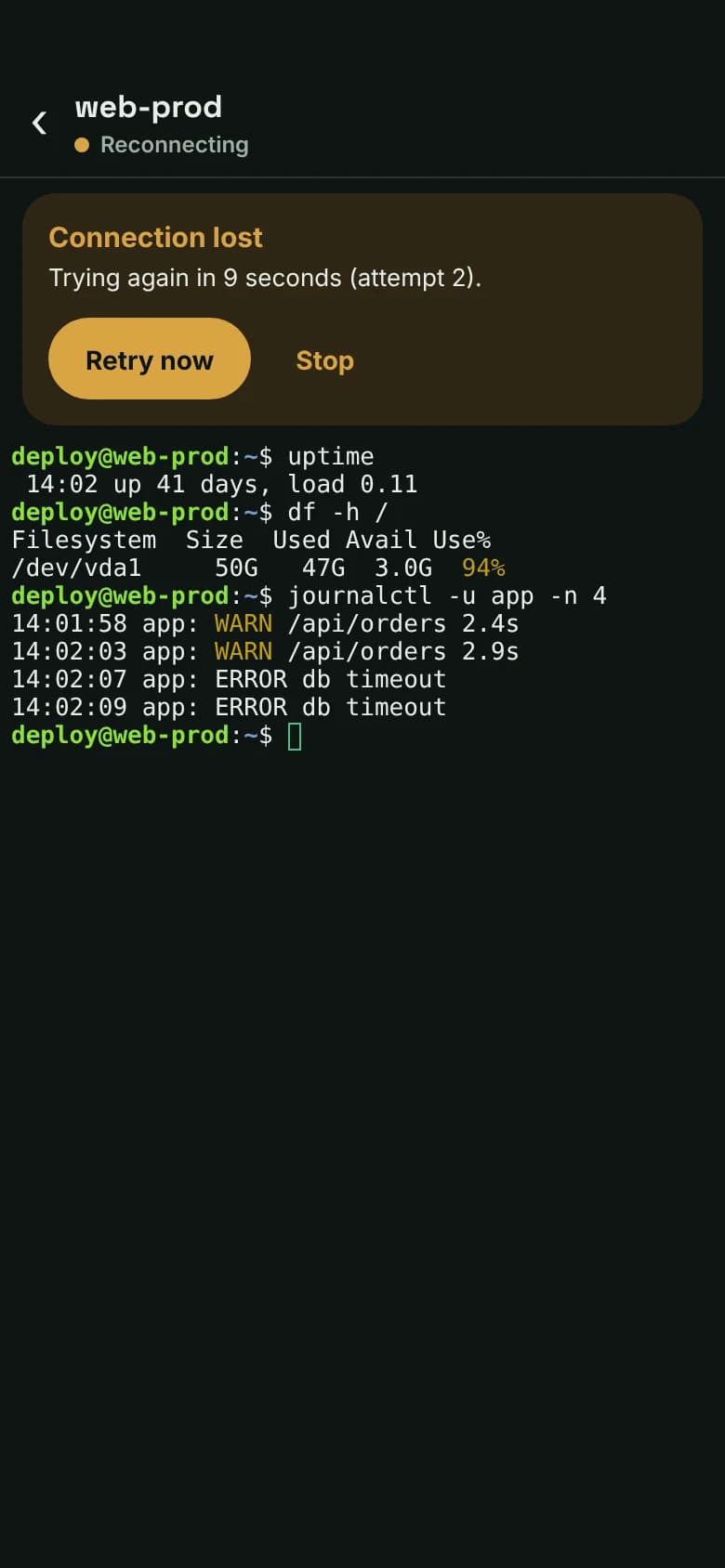
Terminal
Open it and you are back in the session
Tabs for every server, a toolbar with Ctrl, Esc and arrows, and tmux or screen to keep work running.
- 1Status you can trust. Connected, Reconnecting or Not connected, always at the top.
- 2Retry now. No digging through menus when the signal returns.
- +Files and ports. SFTP, jump hosts and port forwarding on the same connection.
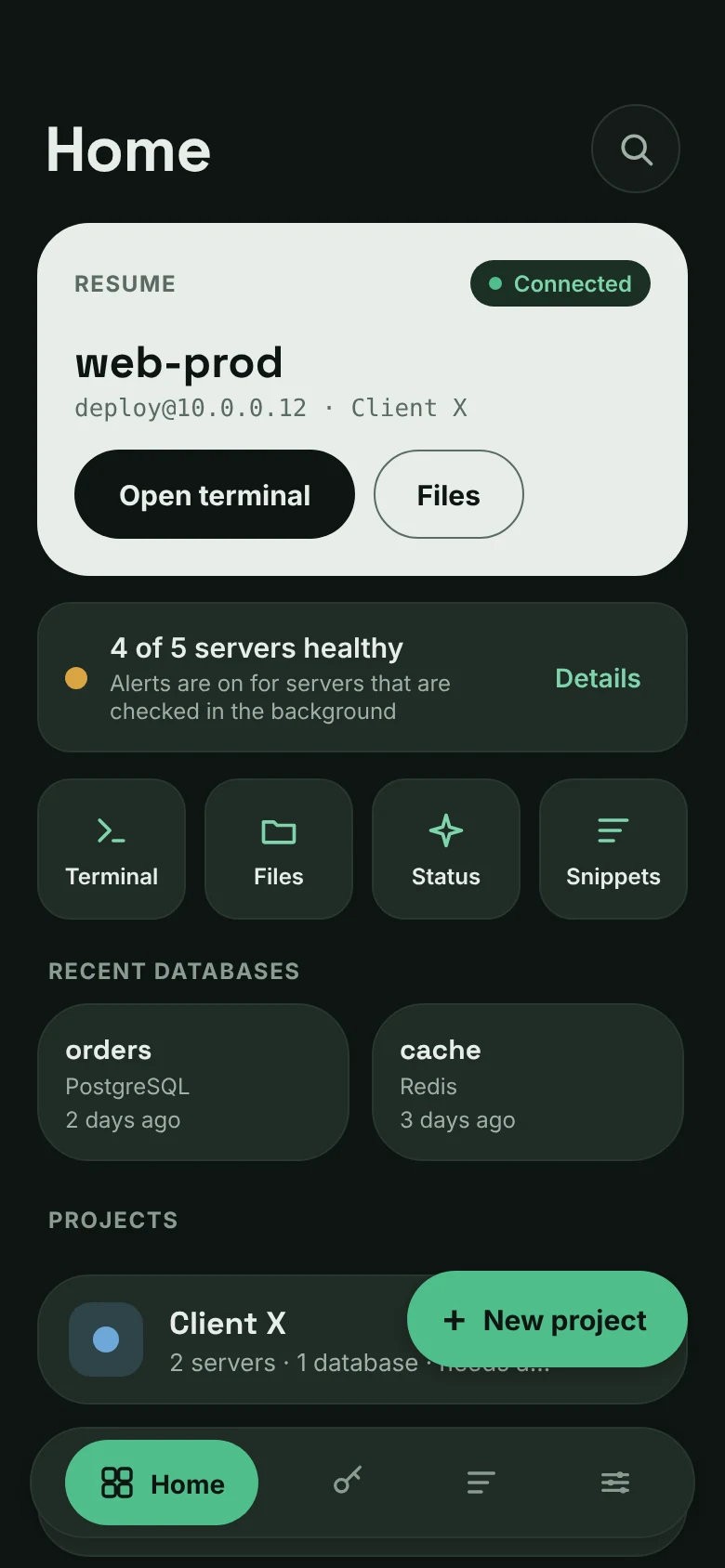
Health
See what needs you before you open anything
Home lists your projects with a health dot per server. When something is wrong you get an alert, not a surprise.
- 1Pick up where you left off. A Resume card connects you to your last server in one tap.
- 2Know before you open anything. One line says how many servers are healthy; Details shows which one needs a look.
- +Alerts. Background checks tell you when disk, memory or load goes past your limit.
Databases
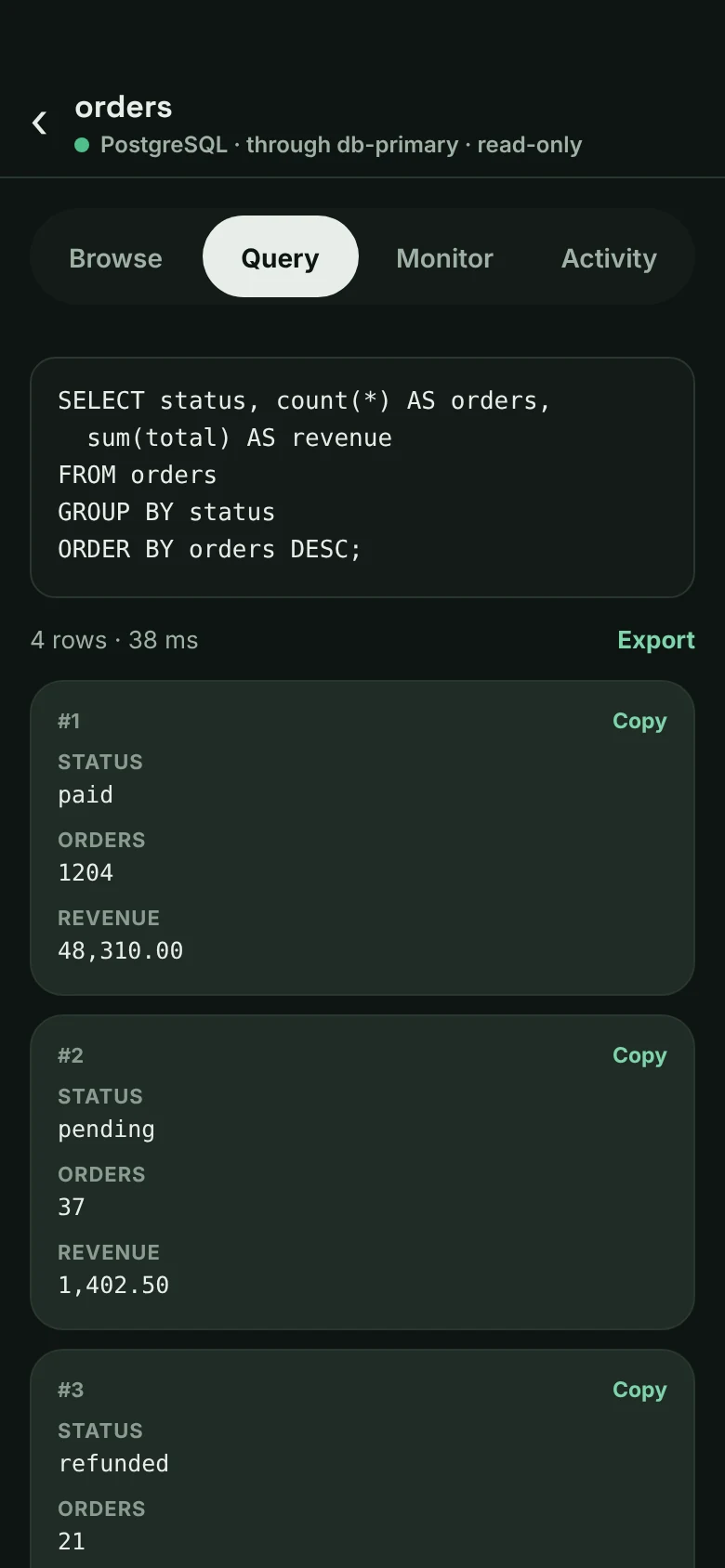
Look inside the database from the same app
PostgreSQL, MySQL, Redis, MongoDB and SQLite. Browse tables, run a query, export the result.
- 1Reach it through the server. Databases only your server can see are fine.
- 2Read first. Safe by default, so a thumb slip does not drop a table.
- +Results stay local. Exports and history never leave the phone.
Security, shown not claimed
Your keys never leave this phone.
Security pages usually ask you to trust a word. Here is the whole picture: a connection goes from your phone to your server, and nowhere else.
Your phone
- Keys encrypted in Android's secure storage
- PIN or fingerprint to open the app
- Server fingerprints remembered
Your server
The only other place a connection goes. AbleSH checks it is the same server as last time.
An AbleSH cloud. It doesn't exist. No account, no sync server, no copy of your keys anywhere we could lose or leak.
Why it costs less
No cloud to run, so no reason to charge for one.
| Feature | AbleSH | A cloud-synced SSH app, for example Termius Pro |
|---|---|---|
| Price per year | $23.99 | About $120 (listed at $10 a month, billed annually) |
| Account | None | Needed for sync |
| Where your data lives | Only on your phone | Your device and their cloud vault |
| Same hosts on several devices | No. Move phones with an encrypted backup | Yes, that is what sync is for |
Termius price from termius.com/pricing, checked October 2026; prices change. Not for you if you need the same hosts on a laptop and a phone at once. A synced app suits you better.
One plan. Everything included.
Best value · about $2 a month · save 33%$23.99
Cancel any time$2.99
₹799 a year or ₹99 a month in India.
How the free trial works, step by step
- Today
- You start the trial in the app through Google Play, which asks you to confirm a payment method. You pay nothing today.
- Day 15
- The 14 days are over: Google Play charges $23.99 or $2.99 unless you cancelled before. It then renews each period until you cancel.
- Any time
- Cancel in Google Play, under Subscriptions. Your data stays on the phone, and you can export it.
Full details on the pricing page and in the refund policy.
Why we built it
AbleSH is made by Veltrix Solutions. We built it because fixing a server from a phone should not mean making an account, handing over your keys, or paying for a cloud you did not ask for.
Questions people ask first
Do I need an account?
No. There is nothing to sign up for. Your servers, keys and snippets live on your phone.
Why does it cost less than other SSH apps?
There is no cloud to run: no sync and no accounts. So there is nothing to pay for beyond building the app.
What happens if I stop subscribing?
Nothing is deleted. Your data stays on the phone behind your PIN, and you can export it first.
Can I use it on two devices?
Not through a cloud, because there is none. To change phones, make an encrypted backup and restore it.
Where can I get AbleSH?
On Google Play: search for AbleSH or open the listing from this page. It is free to install, with 14 days free before the subscription starts.
Is there an iPhone version?
Not yet. AbleSH is for Android.
Is anything sent to you?
Nothing about your servers, keys, snippets or what you type. Your subscription status is checked through Google Play and RevenueCat, and crash reports are off unless you turn them on and hold only a file and line. The privacy policy lists all of it.
The next time a server needs you, be ready.
AbleSH is on Google Play, with 14 days free. No account to make, and your keys stay on your phone.
Opens the Google Play listing. Nothing about you is kept by this site.